AI Avatar: AI Headshots, DP
- 3.2
- Rating
- 1.00M
- Installs
- Free
- Price

 Analysis by App-foxy
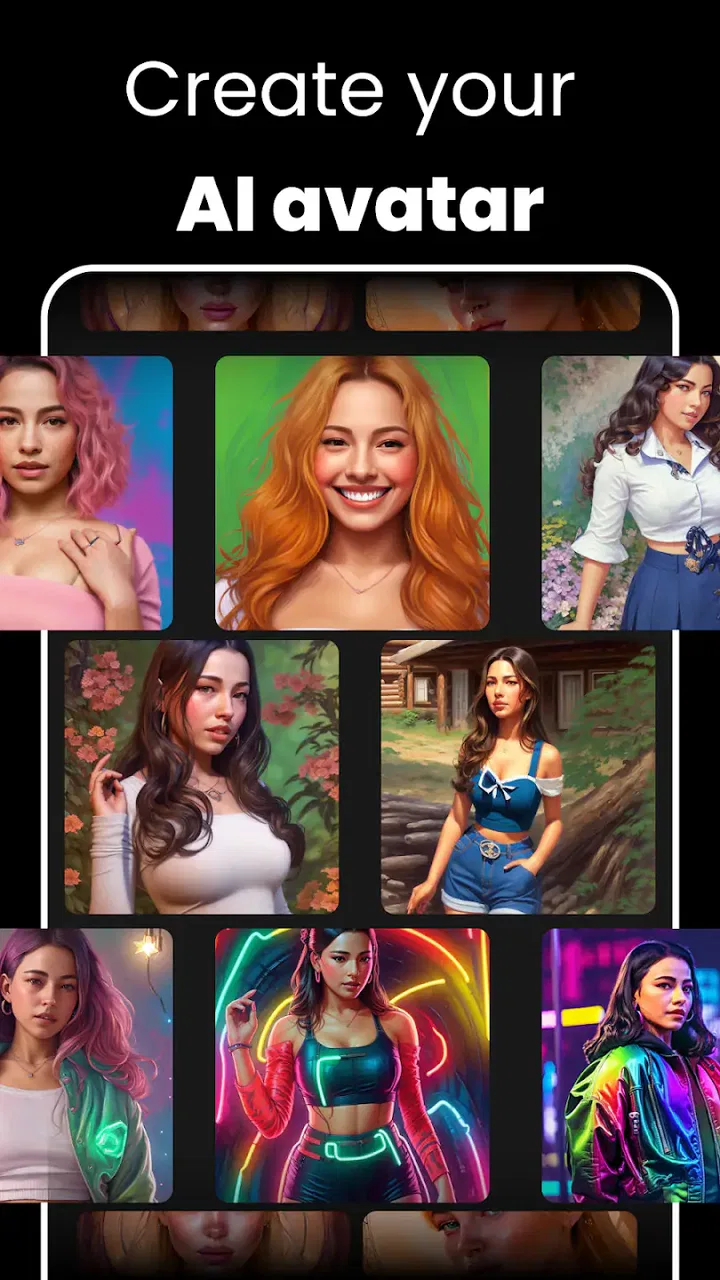
AI Avatar: AI Headshots, DP caught my attention because it promises to turn ordinary selfies into polished profile images without asking me to learn a complicated design tool. It is a free art and design app from Generative AI Magic Tools By Phot.AI, aimed at people who want an AI-made portrait for social networks, dating profiles, messaging apps, or a professional-looking display picture. After spending time with it, my impression is mixed in a useful way: the first session is entertaining and often practical, but the real question is whether the results are good enough to keep the app installed after the novelty wears off.
The app has a 3.2 average from around 9.9 thousand ratings, with more than a million installs. That tells me it has reached a broad audience, but it also suggests that expectations and results do not always line up perfectly. I would not approach it as a complete photography replacement. I see it more as a quick portrait experiment that can occasionally produce a genuinely useful image when I start with the right source photo and accept that some generations will be less convincing than others.
What the first week feels like
During the first week, the strongest appeal is the speed of the transformation. I can begin with a familiar selfie and explore a more deliberate version of my appearance without arranging a photographer, finding studio lighting, or opening a desktop editor. That makes the app especially approachable for someone who needs a new profile picture today rather than a perfect portrait next month.
You May Also Like

 Blood Strike: 2.5 Anniversary
Blood Strike’s Loadouts Turn Every Drop Into a Tactical Gamble
A close look at Blood Strike’s custom loadouts: how fast access to signature weapons reshapes its battle royale rhythm, rewards preparation, and narrows the gap between fights.

 Pandora - Music & Podcasts
Pandora’s Music Is Easy to Start, but Harder to Recover
Pandora’s strength is its low-effort path from a seed to a station. Its weak spot is how much confidence it asks you to place in connection, setup, and quiet recovery.

 8 Ball Pool
 Is Built on Rivalries, Rematches, and Routine
A close look at the rivalries, rematches, shared routines, and unanswered safety questions that turn a quick pool match into a persistent mobile community.

 Samsung Music
’s Quiet Strength Is Playing What You Already Own
Its reach comes less from spectacle than from dependable access to a personal library. That simplicity is both the app’s strongest retention engine and its ceiling.

 AccuWeather: Weather Radar
AccuWeather Review: A Quick, Clear Forecast for Everyday Decisions
For everyday plans, the best forecast is the one you can understand quickly. AccuWeather makes rain timing, radar, and local conditions easy to act on, with a few trade-offs.

 Hill Climb Racing
Why Hill Climb Racing Still Turns Crashes Into One More Run
A tiny car, a bumpy hill and one more upgrade: Hill Climb Racing keeps resurfacing because its simple chaos makes every near-miss feel personal.
More From Our News Desk



The most important early decision is not the style I choose; it is the image I upload. A clear face, reasonable lighting, and a natural expression give the system a better starting point than a group photo, a heavily filtered selfie, or a picture where hair covers much of the face. I found that treating the original image as raw material rather than an afterthought leads to more believable results. Taking several simple selfies first is often more useful than repeatedly trying to rescue one poor image.
That workflow is one of the app’s less obvious lessons. AI portrait tools can make a weak photograph look more decorated, but they cannot reliably fix every problem in the source. If the face is turned sharply, the lighting is uneven, or accessories obscure important features, the generated result may look attractive at a glance while becoming strange around the eyes, hairline, or facial proportions. I recommend keeping the first test deliberately simple so I can judge the transformation rather than the costume around it.
For a new dating profile, the app can be useful when I need several polished options and want to compare how different treatments change the impression I give. For a work profile, I would be more selective. A restrained, natural-looking result is safer than an image that looks obviously synthetic or dramatically unlike me. The fact that an image is technically sharp does not make it trustworthy. People respond to consistency, and a portrait that promises one appearance while I look very different in person can work against its purpose.
The app is also fun for low-stakes experimentation. I can try a more formal look for a professional account, a friendlier portrait for a messaging profile, or a stylized image for a social page. This is where the first-week appeal is strongest: the barrier between idea and image is low. I do not need to understand layers, masks, brushes, or color correction before seeing something new.
Still, I would avoid judging it from one successful preview. AI portraits can look impressive in a small thumbnail and less convincing when enlarged. I check the eyes, teeth, ears, jewelry, hair edges, and the relationship between the head and shoulders before deciding whether an image is usable. Those details matter more than a dramatic background because they determine whether the portrait feels like me.
The app is free to install, which makes trying it easy, but it includes in-app purchases ranging from $2.99 to $149.99 per item. That broad range is important for anyone who enjoys experimenting. A casual user can explore without immediately committing money, while a person who wants frequent generations should think about the cost before turning the app into a regular creative habit. I would not pay for a large option simply because the first result is exciting; I would first confirm that the app consistently produces images I would actually use.
How I would use it for a real profile update
Imagine I need a new profile picture before joining a professional community. I would take several front-facing photos near a window, remove sunglasses and distracting accessories, and choose the one with the clearest expression. I would generate a few restrained portraits, inspect them at full size, and compare them with the original rather than judging them in isolation. If the result changes my face too much, I would reject it even if the clothing and background look polished.
That comparison step is more valuable than endlessly generating variations. It keeps the app focused on communication instead of turning the process into a search for an imaginary version of myself. For a dating profile, I would also include at least one ordinary, recent photo elsewhere in the profile. AI Avatar can improve presentation, but it should not become a substitute for honest context.
Where it beats ordinary alternatives
Compared with a standard camera app, this tool offers more visual direction after the photo has been taken. A camera can capture a natural portrait, but it usually leaves me responsible for lighting, pose, background, and editing. Here, the appeal is the ability to explore a finished concept without manually rebuilding the image.
Compared with a conventional editor, the learning curve is lower. I do not need to know how to separate a subject from a background or balance skin tones. That convenience is valuable for users who want one presentable image rather than a new design hobby. On the other hand, a traditional editor gives me more control and more predictable results. If I care about exact color, accurate clothing details, or a faithful likeness, manual editing or a real portrait session remains the better choice.
Compared with a photographer, the app is obviously faster and easier to repeat, but it cannot replace the judgment of a person who can guide posture, expression, and lighting in real time. I would choose the app for speed, experimentation, and low-pressure profile updates. I would choose a photographer for a business identity, an important announcement, or any situation where authenticity and consistency matter more than convenience.
Does it earn a place after the novelty fades?
The month-to-month value depends on how often my profile needs to change. Most people do not need a new headshot every week, so the app’s recurring usefulness is naturally limited. It becomes more worthwhile for users who manage several online identities, refresh social content regularly, or enjoy creating themed portraits for different occasions. For everyone else, the main benefit may arrive in a short burst: install it, make a useful image, save the best version, and return only when circumstances change.
I would not call that a failure. Not every app needs to become a daily habit. A tool can earn its space by solving an occasional problem well. The difficulty is that AI portrait apps invite repeated browsing because each new style suggests another possibility. That can make the experience feel productive even when I am only making small variations of an image I already have.
My practical rule is to define the purpose before opening the app. If I need a profile picture, I decide what kind of profile it is, what impression I want, and how much resemblance I am willing to sacrifice. This prevents the monthly session from becoming an endless loop of attractive but unusable portraits. The strongest result is usually the one that supports a specific identity, not the one with the most dramatic styling.
There is also a maintenance burden that is easy to overlook. I need to keep track of which image is current, where I used it, and whether it still represents me. If the generated portrait is noticeably older-looking, more formal, or more heavily styled than my current appearance, it can create confusion. I would revisit the image whenever my hairstyle, glasses, facial hair, or general presentation changes significantly.
Another maintenance issue is quality control. A result that looked fine on a phone may reveal artifacts when used as a larger avatar or cropped differently by another service. Before uploading, I check the image in the actual context where it will appear. A portrait with a little extra background may work well in one circular crop and cut off the shoulders or hair in another. Making a small test upload, when possible, saves me from discovering that problem after replacing an important profile image.
The app’s current version is 2.1.38.0, and it runs on Android 7.0 or later. That broad compatibility makes it accessible on older Android devices, although the experience can still depend on the phone’s screen, storage, and general responsiveness. I would keep the app updated through the normal store process, especially if I rely on it for an image I need soon, but I would avoid treating a version number as a promise of identical results on every device.
Privacy is another reason I would use a cautious workflow with any portrait generator. I would select images intentionally rather than uploading a whole camera roll, and I would avoid using other people’s faces without their permission. The app is designed around personal imagery, so the responsible habit is to keep the input limited to what is needed for the result. That is not a reason to dismiss the app, but it is a reason not to use it thoughtlessly.
What causes fatigue over time
The first source of fatigue is sameness. Once I find a style that produces a flattering portrait, many later attempts can feel like minor changes to the same idea. The novelty of seeing myself reinterpreted is powerful at first, but it weakens quickly. If the app does not help me solve a new visual problem, I have little reason to open it again.
The second source is the gap between polished appearance and personal accuracy. A generated portrait may improve lighting and presentation while quietly changing age, face shape, skin texture, or expression. At first I may overlook those changes because the image looks professional. After repeated use, however, I become more aware that the portrait is selling an impression rather than documenting me. That trade-off is acceptable for a playful social image and less comfortable for a formal identity.
The third is the possibility of paying for experimentation without a clear stopping point. Since individual purchases can range from a few dollars to a much higher amount, I would set a personal limit before exploring seriously. I would also save usable results as I go instead of assuming the next generation will be better. The best way to control fatigue and spending is to treat each session as a small project with a defined finish.
There is a creative fatigue too. AI makes it easy to skip the decisions that normally shape a portrait: where to stand, how to face the light, what expression feels natural, and what clothing communicates the right mood. That convenience can flatten personal style. I get more lasting value when I combine the app with a thoughtful original photo instead of asking it to invent the entire identity from a careless selfie.
For that reason, I would skip this app if I need strict facial accuracy, professional retouching control, transparent consistency across a team, or a portrait that must match an official document. I would also skip it if I dislike the idea of AI altering my appearance or if I am likely to spend impulsively chasing a perfect result. A normal camera, a basic editor, or a photographer would be a better fit in those situations.
I would recommend trying it to a friend who wants a quick profile refresh, enjoys visual experimentation, or needs several presentable concepts without learning advanced editing. I would recommend it less strongly to someone seeking a permanent professional identity. In that case, the app can still help with ideas, but I would use the generated image as a reference rather than the final answer.
My long-term verdict
AI Avatar: AI Headshots, DP earns a place as an occasional utility rather than an essential everyday app. Its free entry point and simple concept make the first week appealing, and it can save time when I need a polished avatar quickly. The strongest results come from careful source photos, restrained choices, and a willingness to reject images that look attractive but do not resemble me closely enough.
Its lasting value is narrower. Once I have a suitable portrait, repeated sessions can become a cycle of small variations, and the purchase range makes uncontrolled experimentation a poor habit. The app also asks me to maintain a healthy balance between presentation and authenticity. That balance is manageable, but it requires more judgment than the effortless interface might suggest.
The Teen content rating is a reminder that this is a creative image tool for a broad audience, not a replacement for adult professional photography or identity verification. I would use it for social, dating, and informal profile needs, while keeping more important public-facing images grounded in reality. The developer, Generative AI Magic Tools By Phot.AI, has made the basic idea approachable, but convenience does not remove the need for careful image selection.
My recommendation is to install it for a specific portrait goal, not simply because AI avatars are entertaining. If it gives me one believable image that improves a profile, it has done its job. If I find myself generating portraits without knowing where I will use them, the novelty has already become the product. In my experience, the app is worth trying, but it earns long-term space only when it supports a recurring need rather than replacing one.
FAQs for AI Avatar: AI Headshots, DP
01What is AI Avatar: AI Headshots, DP, and what can it do?
AI Avatar: AI Headshots, DP is a photo-editing and avatar-generation app designed to turn ordinary selfies into polished profile pictures, professional headshots, and creative digital portraits. After uploading a photo, users can usually choose from different visual styles, backgrounds, outfits, and effects. It is useful for social media profiles, messaging apps, gaming accounts, dating profiles, and professional platforms, although the final result depends heavily on the quality and suitability of the original image.
02How do I create an AI headshot or avatar in the app?
To create an image, you generally need to select or capture a clear selfie and upload it through the app’s image-generation section. The app may ask you to choose a style, theme, or portrait category before processing the photo. For better results, use a well-lit image with your face clearly visible and avoid sunglasses, heavy filters, group photos, or extreme angles. Processing time can vary depending on the selected style and server activity.
03Is AI Avatar: AI Headshots, DP free to use?
The app may be available to download for free, but some features, styles, image packs, or high-resolution exports can require in-app purchases or a subscription. Free users may also encounter advertisements, usage limits, or a restricted selection of templates. Before confirming a purchase, carefully review the pricing, trial period, renewal terms, and cancellation instructions shown in the app store or inside the application, since availability and costs can change over time.
04What should I know about privacy when uploading photos?
Because the app needs access to your photos or camera to generate avatars and headshots, privacy is an important consideration before use. Check the app’s current privacy policy to understand how images are uploaded, processed, stored, and deleted, and whether data is shared with service providers. Avoid uploading sensitive images or photos of other people without permission. You should also review requested permissions and disable any access that is not necessary.
05Will the generated headshots look exactly like me?
AI-generated portraits can produce attractive and convincing results, but they are not guaranteed to be perfectly accurate. The app may alter facial details, hair, skin texture, clothing, lighting, or background depending on the selected style. Results are usually better when the source photo is sharp, front-facing, and well lit. You may need to try several photos or styles, and some generated images can contain small visual errors or details that do not match your real appearance.
Pros
- Creates polished AI headshots quickly from uploaded selfies.
- Offers multiple professional styles for profiles and resumes.
- Useful for social media
- dating profiles
- and business networking.
- Easy interface with minimal editing experience required.
- Saves time and money compared with booking a professional photoshoot.
Cons
- Results can vary significantly depending on selfie quality.
- Some generated faces may look overly smooth or artificial.
- The best styles and features may require a paid subscription.
- Processing uploads may raise privacy concerns for some users.
- Occasional outputs can include small facial or clothing inconsistencies.

AI Avatar: AI Headshots, DP
Gallery